Posts

Real-life Stories

Image
There is nothing like a story to inspire, uplift, and give hope that anything is possible.  Now imagine listening to the real-life stories of women as they share their experiences that exemplify the traits of determination, passion, advocate, resilience, inspire, and endurance. That is powerful. With my school district's equity challenge, my director of IT enlisted the help of others to host a 'real-life stories' night to highlight the experiences of women in IT.  I was honored to be invited as one of the speakers along with two of my former students. The stories were incredible - a refugee who endured to establish a new life for her family, spending her last coins on buying a dictionary in order to learn English and who is now an IT specialist; a medical school student who is now researching neuroscience and learned to be 'relentlessly optimistic'; two students who first experienced the power of computer science as members of their robotics team in middle school wh...

Going for the Gold

Image
I had a very special experience recently - to attend my first Girl Scout Gold Award ceremony. This year, I've been the project mentor for a former student of mine who has been working on her Gold Award. Her project? To start Coding Clubs in the community, of course!  We started back in the fall of 2016 by running a few coding clubs at a Boys and Girls Club and a public library to see which materials would work the best. She decided to go with Code.org's K-5 curriculum for a few different reasons - accessible entry point to CS for ALL kids no matter their background, streamlined platform with easy sign-in and tracking participants' progress. So, she did it! She continued by reaching out to new community centers and recruited high school friends who needed volunteer hours to help run the clubs. The best part? She created continuity folders so that each site could continue running the clubs on their own. This ceremony was the very first event held at the brand-new Parsons Lead...

Discover and uncover

Image
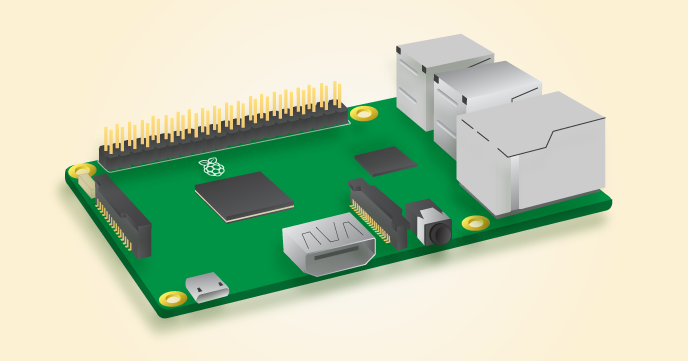
I've been moving on with CS Discoveries. In between Units 1 and 2, I had my students explore a variety of centers including Raspberry Pi, Finch robots and Hummingbird robotics. After Unit 1 where they defined what a computer was and really dove into input, storage, processing and output, I wanted them to have a hands-on experience of seeing input and output in action. In particular, I love this diagram of Raspberry Pi to really drive this point home of what computers are and the video available here. Input devices (e.g. keyboard, mouse) send data to a computer. Output devices (e.g. monitor, speakers) send data to the user. Storage in the Raspberry Pi is in the form of a microSD card. Now moving on to Unit  of CS Discoveries. I thought that the sequence of lessons that led up to this lesson were critical in several ways - Lesson 1 to really have students notice and observe the structure and formatting that appears on websites - differences, similarities and why such structures exi...

APP-lying the Problem-solving Process

Image
I'm wrapping up Unit 1 of CSDiscoveries with lessons 8 and 9 that really complement one another well. With lesson 8, we spent time considering the input and output of apps and whether input comes from the user, internet, or smartphone. Students spent time considering what information is input to the smartphone, what problem the app is trying to solve, what information is process by the smartphone, and what information is output to the smartphone.  With lesson 9, I initially thought that my students may be a little disappointed that they were not actually going to code their app, but they ended up having a great time. I really tried to focus them on applying the problem-solving process that we've been focusing on all unit to their app concept creation and then also ensuring that they included input, output, storage, processing on their posters. During the making of the posters, I tried to bring up algorithms again and apply this to their app concepts. For example with Coupon Cl...

Colored Bits

Image
I'm moving along with CSDiscoveries and this week continued with lesson 6 called Processing with Bits.  This lesson was awesome!! My students really enjoyed going through all the levels and figuring them out in pairs.  They used the pixel filtering tool to explore how colors are represented using on/off options and combinations. I tried to make the connection to previous lessons ( L4 - what is a computer ?; L5 - representing with binary ) explicit so that students could connect what they did with the face up/down challenge to input/processing/output and representing information using binary in this lesson. I did not go into colors, binary, and computers, but just treated this lesson at face-value and had students go through the leveled puzzles that were scaffolded really well. The initial task of identifying the 8 colors along with their 'binary representation' was important and students could use that to refer to as they completed the subsequent puzzle levels. I ended up ...

I'm a pilot!

With the new year, comes new challenges and...new curriculum that I am piloting this semester. I am so excited that Code.org's long-awaited computer science curriculum for 7th-9th graders is here. It's called CS Discoveries. At its heart, it truly has the middle schooler in mind. With a focus on personal expression through a project-based approach, it is appealing to this age range and there desire to express their unique perspectives, interests, and goals. It is designed to be accessible to every learner, and provides the perfect transition to typed code from block programming. At the same time, the tools used in this course such as App Lab and Game Lab are open-ended enough to be engaging for all students, regardless of programming background. Physical computing is also integrating into this course, providing students with the opportunities to 'make things happen' with an Arduino platform. The heartbeat of the course is the problem-solving process which is integrated ...

Ever wanted to track Santa?

Image
Now you can! Google's  Santa Tracker  is just in time for the holidays where students can code a snowflake, track Santa using Google maps and more. New activities and lessons unlock throughout the month of December and are connected to subject areas such as computer science, geography, social studies, and language.  Play, learn, watch, code, and explore!  Here is a sampling: Code Boogie - Choreograph a dance for the elves using code Holiday Traditions - Learn about traditions all around the world from Canada to Ghana, France to Australia. Learn Languages - See and hear different holiday greetings translated into different languages Play Present Bounce - Try to get the present to land in just the right place There are these and more activities to come throughout the month, right here in Santa's Village.   On the 24th, there is an invitation to come back and track Santa all night!