Posts

Discover and uncover
Image
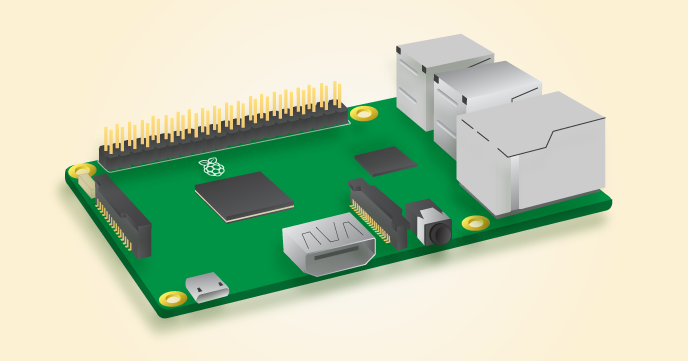
I've been moving on with CS Discoveries. In between Units 1 and 2, I had my students explore a variety of centers including Raspberry Pi, Finch robots and Hummingbird robotics. After Unit 1 where they defined what a computer was and really dove into input, storage, processing and output, I wanted them to have a hands-on experience of seeing input and output in action. In particular, I love this diagram of Raspberry Pi to really drive this point home of what computers are and the video available here. Input devices (e.g. keyboard, mouse) send data to a computer. Output devices (e.g. monitor, speakers) send data to the user. Storage in the Raspberry Pi is in the form of a microSD card. Now moving on to Unit  of CS Discoveries. I thought that the sequence of lessons that led up to this lesson were critical in several ways - Lesson 1 to really have students notice and observe the structure and formatting that appears on websites - differences, similarities and why such structures exi...

APP-lying the Problem-solving Process

Image
I'm wrapping up Unit 1 of CSDiscoveries with lessons 8 and 9 that really complement one another well. With lesson 8, we spent time considering the input and output of apps and whether input comes from the user, internet, or smartphone. Students spent time considering what information is input to the smartphone, what problem the app is trying to solve, what information is process by the smartphone, and what information is output to the smartphone.  With lesson 9, I initially thought that my students may be a little disappointed that they were not actually going to code their app, but they ended up having a great time. I really tried to focus them on applying the problem-solving process that we've been focusing on all unit to their app concept creation and then also ensuring that they included input, output, storage, processing on their posters. During the making of the posters, I tried to bring up algorithms again and apply this to their app concepts. For example with Coupon Cl...

Colored Bits

Image
I'm moving along with CSDiscoveries and this week continued with lesson 6 called Processing with Bits.  This lesson was awesome!! My students really enjoyed going through all the levels and figuring them out in pairs.  They used the pixel filtering tool to explore how colors are represented using on/off options and combinations. I tried to make the connection to previous lessons ( L4 - what is a computer ?; L5 - representing with binary ) explicit so that students could connect what they did with the face up/down challenge to input/processing/output and representing information using binary in this lesson. I did not go into colors, binary, and computers, but just treated this lesson at face-value and had students go through the leveled puzzles that were scaffolded really well. The initial task of identifying the 8 colors along with their 'binary representation' was important and students could use that to refer to as they completed the subsequent puzzle levels. I ended up ...

I'm a pilot!

With the new year, comes new challenges and...new curriculum that I am piloting this semester. I am so excited that Code.org's long-awaited computer science curriculum for 7th-9th graders is here. It's called CS Discoveries. At its heart, it truly has the middle schooler in mind. With a focus on personal expression through a project-based approach, it is appealing to this age range and there desire to express their unique perspectives, interests, and goals. It is designed to be accessible to every learner, and provides the perfect transition to typed code from block programming. At the same time, the tools used in this course such as App Lab and Game Lab are open-ended enough to be engaging for all students, regardless of programming background. Physical computing is also integrating into this course, providing students with the opportunities to 'make things happen' with an Arduino platform. The heartbeat of the course is the problem-solving process which is integrated ...

Ever wanted to track Santa?

Image
Now you can! Google's  Santa Tracker  is just in time for the holidays where students can code a snowflake, track Santa using Google maps and more. New activities and lessons unlock throughout the month of December and are connected to subject areas such as computer science, geography, social studies, and language.  Play, learn, watch, code, and explore!  Here is a sampling: Code Boogie - Choreograph a dance for the elves using code Holiday Traditions - Learn about traditions all around the world from Canada to Ghana, France to Australia. Learn Languages - See and hear different holiday greetings translated into different languages Play Present Bounce - Try to get the present to land in just the right place There are these and more activities to come throughout the month, right here in Santa's Village.   On the 24th, there is an invitation to come back and track Santa all night!

Equity in CS: Empowered to take action

Image
A few years ago, Google came out with a paper entitled, "Women Who Choose Computer Science - What Really Matters." The link to the entire paper is available here.   It's an incredible paper in many ways, but the big takeaway for me was that we are in a position to do something to close the gender gap in education right now. To me, this was incredibly empowering - to realize that there are factors substantiated by research that make a tremendous difference in a girl's life in terms of choosing CS as a degree major. According to the paper, it all comes down to encouragement and exposure. Specifically, this paper found four key influencing factors: social encouragement, self perception, academic exposure, and career perception. Even more amazing was that this research found that uncontrollable factors such as parental occupation play a limited role in women choosing a CS degree. Armed with this understanding of the impact that exposure and encouragement can have, I start...

Get Ready! Hour of Code 2016

Image
I am so excited to share about the more than 200 Hour of Code activities available here . What is the Hour of Code? It's a global effort to "celebrate computer science" that has engaged communities all over in one-hour tutorials.  It is held during Computer Science Education Week to recognize " Amazing Grace' s" birthday. One of my favorite quotes from Grace Hopper herself: "I've always been more interested in the future than in the past." How fitting a statement to describe the Hour of Code as it inspires our future with the wonders and possibilities of computer science. A really awesome feature on the Hour of Code site  here  is the filter tool that allows searching by grade level, teacher experience, student experience, classroom technology available (Android, iPad, no computers and more), topic, activity type, length, and language (blocks, typing, or other). For those with no computers or devices, it is still possible to teach computer scie...